
Table of Contents
This post serves as an update to an earlier post I did that used the legacy UPS Developer Kit. The legacy developer kit will become deprecated June 2024 in favor of the new API that uses the OAuth 2.0 security model.
This new API implementation can be more complicated than the old “API key” method, but the industry as a whole is pivoting or has pivoted to the OAuth 2.0 security model.

What is Oauth2
Oauth 2.0 is an authorization framework that allows an application access to information or services. Rather than using a permanent passkey or “apikey”, “access tokens” are requested and granted.
Access tokens are temporary. They are also granular — meaning an application or user can be given discretionary access.
Creating a UPS App
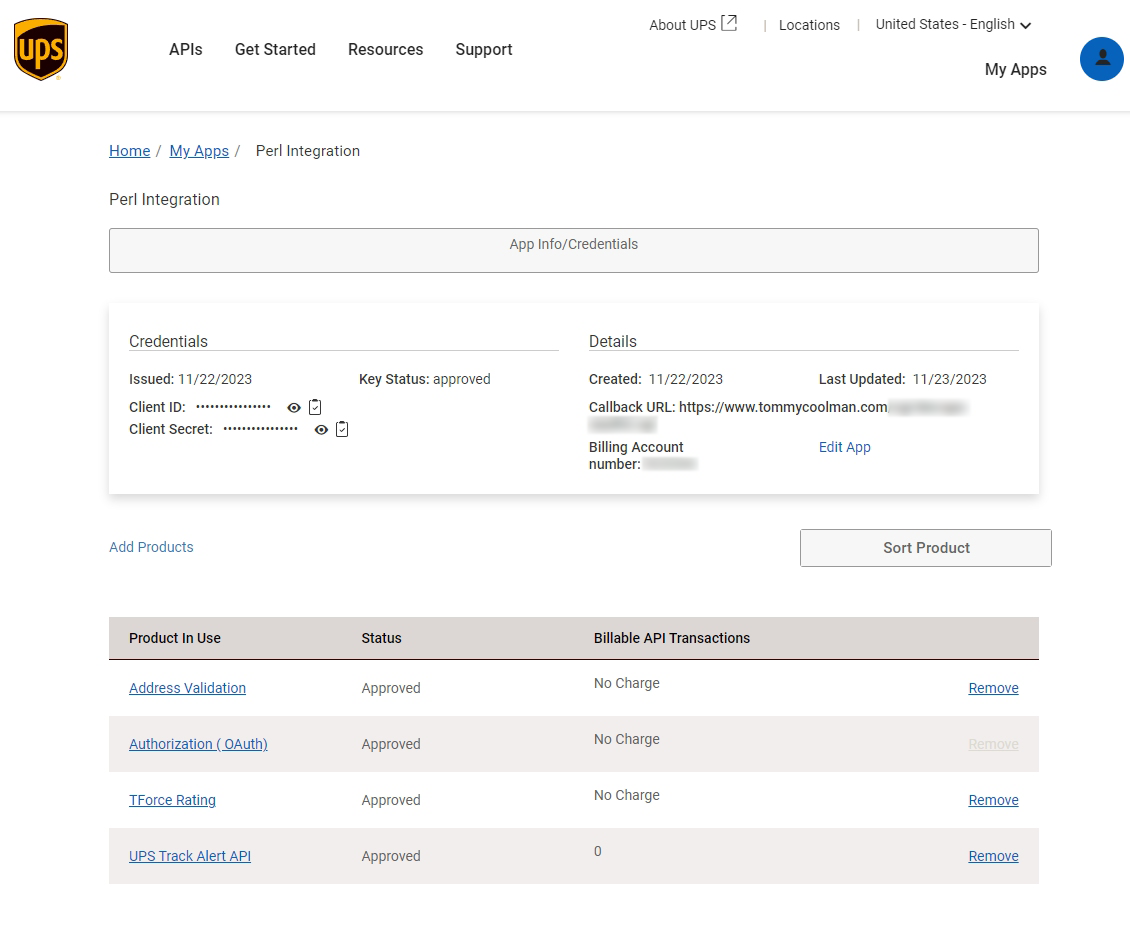
Login to the UPS Developer Portal. You will need to create an App. Creating an App will give you the ‘Client ID’ and ‘Client Secret.’ A ‘callback’ URL is needed in order to receive information back from the UPS servers. Not every type of request will need the callback URL.
Sandbox vs Production
sandbox = 'https://wwwcie.ups.com';
production = 'https://onlinetools.ups.com';
The UPS API has two endpoints. One endpoint is for testing — UPS calls it the ‘client integration endpoint’ (CIE), but I refer to these as the ‘sandbox’. The other endpoint is for production code.
The two endpoints behave differently in practice. For example, the sandbox is restricted on what addresses it can validate. You might get an error that says “The state is not supported in the Customer Integration Environment.”
I use the sandbox endpoint in most cases, but I will switch to production whenever spurious error messages appear.
Support Libraries
You may need to install various support libraries depending on which scripting language you choose. For example Perl uses LWP::UserAgent which requires LWP::Protocol::https. PHP uses ‘curl’ which requires the php-curl package. Etc.
Generate Access Token
Your ‘Client ID’ and ‘Client Secret’ are used to obtain an access token from the UPS authentication server. This token required for making further API calls.
The token is (typically) valid for 4 hours. It is not necessary to generate one with each API call. You can “cache” the token, but that is outside the scope of these simple examples.
Perl
#!/usr/bin/perl

use JSON::MaybeXS qw(encode_json decode_json);
use LWP::UserAgent;
use HTTP::Request;
use HTTP::Headers;

$productionMode = 'production';

$baseURL{'sandbox'}     = 'https://wwwcie.ups.com';
$baseURL{'production'}  = 'https://onlinetools.ups.com';

$clientid       = 'YOUR CLIENT ID';
$clientsecret   = 'YOUR CLIENT SECRET';

$accessToken = createToken();
print $accessToken;

sub createToken(){
    my $endpoint  = '/security/v1/oauth/token';
    my $headers   = HTTP::Headers->new;
    my $payload   = "grant_type=client_credentials";

    $headers->header(   'Content-Type' => 'application/x-www-form-urlencoded');
    my $req = HTTP::Request->new('POST', $baseURL{$productionMode}.$endpoint, $headers, $payload);
    $req->authorization_basic($clientid, $clientsecret);
    my $contentstring = LWP::UserAgent->new->request($req)->content;

    my $response = decode_json $contentstring;

    return $response->{'access_token'};
}
PHP
<?php
  $curl = curl_init();

  $payload      = "grant_type=client_credentials";

  $clientid       = 'YOUR CLIENT ID';
  $clientsecret   = 'YOUR CLIENT SECRET';

  $endpoint     = 'https://wwwcie.ups.com/security/v1/oauth/token';

  curl_setopt_array($curl, [
    CURLOPT_HTTPHEADER => [
      "Content-Type: application/x-www-form-urlencoded",
      "Authorization: Basic " . base64_encode($clientid.':'.$clientsecret)
    ],
    CURLOPT_POSTFIELDS => $payload,
    CURLOPT_URL => $endpoint,
    CURLOPT_RETURNTRANSFER => true,
    CURLOPT_CUSTOMREQUEST => "POST",
  ]);

  $response = curl_exec($curl);
  curl_close($curl);
  $obj = json_decode($response);
  print $obj->access_token;
?>
Python
#!/usr/bin/env python3

import requests

clientid = "YOUR CLIENT ID"
clientsecret = "YOUR CLIENT SECRET"

def createToken():
    url = "https://wwwcie.ups.com/security/v1/oauth/token"

    payload = {
    "grant_type": "client_credentials"
    }

    headers = {"Content-Type": "application/x-www-form-urlencoded"}
    response = requests.post(url, data=payload, headers=headers, auth=(clientid,clientsecret))

    data = response.json()
    return data['access_token']

print createToken()
API Response, JSON
{
    "token_type": "Bearer",
    "issued_at": "1700851413566",
    "client_id": "YOUR_CLIENT_ID",
    "access_token": "ACCESS_TOKEN",
    "expires_in": "14399",
    "status": "approved"
}
Address Validation
Perl
#!/usr/bin/perl

use JSON::MaybeXS qw(encode_json decode_json);
use LWP::UserAgent;
use HTTP::Request;
use HTTP::Headers;

$productionMode = 'production';

$baseURL{'sandbox'}     = 'https://wwwcie.ups.com';
$baseURL{'production'}  = 'https://onlinetools.ups.com';

$clientid       = 'YOUR CLIENT ID';
$clientsecret   = 'YOUR CLIENT SECRET';

%payload = (
    "XAVRequest" => {
        "AddressKeyFormat" => {
            "ConsigneeName"         => "Mr. President",
            "AddressLine"           => ["1600 Pennsylvania Avenue North West"],
            "PoliticalDivision2"    => "WASHINGTON",
            "PoliticalDivision1"    => "DC",
            "PostcodePrimaryLow"    => "20500",
            "CountryCode"           => "US"
        }
    }
);

$payloadstring = encode_json \%payload;

createToken();
validate();

sub validate(){
    my $endpoint  = '/api/addressvalidation/v1/3?regionalrequestindicator=false&maximumcandidatelistsize=1';
    my $headers   = HTTP::Headers->new;

    $headers->header(   'Content-Type' => 'application/json',
                        'Authorization' => "Bearer $accessToken");
    my $req = HTTP::Request->new('POST', $baseURL{$productionMode}.$endpoint, $headers, $payloadstring);
    my $responsestring = LWP::UserAgent->new->request($req)->content;
    print $responsestring;
}

sub createToken(){
    my $endpoint  = '/security/v1/oauth/token';
    my $headers   = HTTP::Headers->new;
    my $payload   = "grant_type=client_credentials";

    $headers->header(   'Content-Type' => 'application/x-www-form-urlencoded');
    my $req = HTTP::Request->new('POST', $baseURL{$productionMode}.$endpoint, $headers, $payload);
    $req->authorization_basic($clientid, $clientsecret);
    my $responsestring = LWP::UserAgent->new->request($req)->content;
    my $response = decode_json $responsestring;
    $accessToken = $response->{'access_token'};
}
PHP
<?php

$productionMode = 'production';

$baseURL = array(
    'sandbox'      => 'https://wwwcie.ups.com',
    'production'   => 'https://onlinetools.ups.com'
);

$clientid       = 'YOUR CLIENT ID';
$clientsecret   = 'YOUR CLIENT SECRET';

$payload = array(
    "XAVRequest" => array(
        "AddressKeyFormat" => array(
            "ConsigneeName"         => "Mr. President",
            "AddressLine"           => array("1600 Pennsylvania Avenue North West"),
            "PoliticalDivision2"    => "WASHINGTON",
            "PoliticalDivision1"    => "DC",
            "PostcodePrimaryLow"    => "20500",
            "CountryCode"           => "US"
        )
    )
);

$payloadstring = json_encode($payload);

createToken();
validate();

function validate() {
    global $baseURL, $productionMode, $accessToken, $payloadstring;

    $endpoint = '/api/addressvalidation/v1/3?regionalrequestindicator=false&maximumcandidatelistsize=1';
    $url = $baseURL[$productionMode] . $endpoint;

    $headers = array(
        'Content-Type: application/json',
        'Authorization: Bearer ' . $accessToken
    );

    $ch = curl_init($url);
    curl_setopt($ch, CURLOPT_HTTPHEADER, $headers);
    curl_setopt($ch, CURLOPT_POST, true);
    curl_setopt($ch, CURLOPT_POSTFIELDS, $payloadstring);
    curl_setopt($ch, CURLOPT_RETURNTRANSFER, true);

    $responsestring = curl_exec($ch);
    curl_close($ch);

    echo $responsestring;
}

function createToken() {
    global $baseURL, $productionMode, $clientid, $clientsecret, $accessToken;

    $endpoint = '/security/v1/oauth/token';
    $url = $baseURL[$productionMode] . $endpoint;
    $payload = "grant_type=client_credentials";

    $headers = array(
        'Content-Type: application/x-www-form-urlencoded'
    );

    $ch = curl_init($url);
    curl_setopt($ch, CURLOPT_HTTPHEADER, $headers);
    curl_setopt($ch, CURLOPT_POST, true);
    curl_setopt($ch, CURLOPT_POSTFIELDS, $payload);
    curl_setopt($ch, CURLOPT_USERPWD, $clientid . ':' . $clientsecret);
    curl_setopt($ch, CURLOPT_RETURNTRANSFER, true);

    $responsestring = curl_exec($ch);
    curl_close($ch);

    $response = json_decode($responsestring, true);
    $accessToken = $response['access_token'];
}

?>
Python
#!/usr/bin/env python3

import requests

clientid = "YOUR CLIENT ID"
clientsecret = "YOUR CLIENT SECRET"

def createToken():
    url = "https://onlinetools.ups.com/security/v1/oauth/token"

    payload = {
    "grant_type": "client_credentials"
    }

    headers = {"Content-Type": "application/x-www-form-urlencoded"}
    response = requests.post(url, data=payload, headers=headers, auth=(clientid,clientsecret))

    data = response.json()

    return data['access_token']

accessToken = createToken()

requestoption = "3"
version = "v2"
url = "https://onlinetools.ups.com/api/addressvalidation/" + version + "/" + requestoption

query = {
  "regionalrequestindicator": "string",
  "maximumcandidatelistsize": "1"
}

payload = {
  "XAVRequest": {
    "AddressKeyFormat": {
      "ConsigneeName": "Mr. President",
      "AddressLine": [
        "1600 Pennsylvania Avenue North West"
      ],
      "Region": "WASHINGTON,DC,20500",
      "PoliticalDivision2": "WASHINGTON",
      "PoliticalDivision1": "DC",
      "PostcodePrimaryLow": "20500",
      "CountryCode": "US"
    }
  }
}

headers = {
  "Content-Type": "application/json",
  "Authorization": "Bearer " + accessToken
}

response = requests.post(url, json=payload, headers=headers, params=query)

data = response.json()
print(data)
API Response
You should get a JSON response that looks like this:
{
    "XAVResponse": {
        "Response": {
            "ResponseStatus": {
                "Code": "1",
                "Description": "Success"
            }
        },
        "ValidAddressIndicator": "",
        "AddressClassification": {
            "Code": "0",
            "Description": "Unknown"
        },
        "Candidate": {
            "AddressClassification": {
                "Code": "0",
                "Description": "Unknown"
            },
            "AddressKeyFormat": {
                "AddressLine": "1600 PENNSYLVANIA AVE NW",
                "PoliticalDivision2": "WASHINGTON",
                "PoliticalDivision1": "DC",
                "PostcodePrimaryLow": "20500",
                "PostcodeExtendedLow": "0005",
                "Region": "WASHINGTON DC 20500-0005",
                "CountryCode": "US"
            }
        }
    }
}
| Original address: 1600 Pennsylvania Avenue North West WASHINGTON, DC 20500 US | New address candidate: 1600 PENNSYLVANIA AVE NW WASHINGTON, DC 20500-0005 US |
Things to Remember
- UPS will only do street level validation. Apartment numbers, building numbers, floor numbers, suites — anything that is Address Line 2 — is never validated. You will have to save this data separately and reconcile validated address with this extra information.
- The information returned are “Address Candidates” or “best guesses.” It is not always perfect and there are times where you will receive more than one address candidate.

Tracking Integration
Package tracking information can also be accessed using your developer credentials. Note that the API endpoints change for tracking.
Perl
#!/usr/bin/perl

use JSON::MaybeXS qw(encode_json decode_json);
use LWP::UserAgent;
use HTTP::Request;
use HTTP::Headers;

$trackingno = '1ZXXXXXXXXXXXXXXXX';
$productionMode = 'production';
$accessToken = '';

$baseURL{'sandbox'}     = 'https://wwwcie.ups.com';
$baseURL{'production'}  = 'https://onlinetools.ups.com';

$clientid       = 'YOUR CLIENT ID';
$clientsecret   = 'YOUR CLIENT SECRET';

createToken();
track();

sub track(){
    my $endpoint = '/api/track/v1/details/'.$trackingno;
    my $headers   = HTTP::Headers->new;
    my $payload   = "locale=en_US,returnSignature=false,returnMilestones=false,returnPOD=false";

    $headers->header(
        'Content-Type' => 'application/x-www-form-urlencoded',
        'transId' => 'string',
        'transactionSrc' => 'testing',
        'Authorization' => "Bearer $accessToken",
    );

    my $req = HTTP::Request->new('GET', $baseURL{$productionMode}.$endpoint, $headers, $payload);
    my $contentstring = LWP::UserAgent->new->request($req)->content;

    print $contentstring;
}

sub createToken(){
    my $endpoint  = '/security/v1/oauth/token';
    my $headers   = HTTP::Headers->new;
    my $payload   = "grant_type=client_credentials";

    $headers->header(   'Content-Type' => 'application/x-www-form-urlencoded');
    my $req = HTTP::Request->new('POST', $baseURL{$productionMode}.$endpoint, $headers, $payload);
    $req->authorization_basic($clientid, $clientsecret);
    my $contentstring = LWP::UserAgent->new->request($req)->content;

    my $response = decode_json $contentstring;
    $accessToken = $response->{'access_token'};
}
PHP
<?php

$trackingno = '1ZXXXXXXXXXXXXXXXX';
$productionMode = 'production';
$accessToken = '';

$baseURL = array(
    'sandbox'     => 'https://wwwcie.ups.com',
    'production'  => 'https://onlinetools.ups.com'
);

$clientid       = 'YOUR CLIENT ID';
$clientsecret   = 'YOUR CLIENT SECRET';

header("Content-type: text/html");

createToken();
track();

function track(){
    global $baseURL, $productionMode, $trackingno, $accessToken;

    $endpoint = '/api/track/v1/details/' . $trackingno;
    $url = $baseURL[$productionMode] . $endpoint;
    $payload = "locale=en_US,returnSignature=false,returnMilestones=false,returnPOD=false";

    $headers = array(
        'Content-Type' => 'application/x-www-form-urlencoded',
        'transId' => 'string',
        'transactionSrc' => 'testing',
        'Authorization' => 'Bearer ' . $accessToken
    );

    $ch = curl_init();
    curl_setopt($ch, CURLOPT_URL, $url);
    curl_setopt($ch, CURLOPT_HTTPHEADER, formatHeaders($headers));
    curl_setopt($ch, CURLOPT_CUSTOMREQUEST, 'GET');
    curl_setopt($ch, CURLOPT_POSTFIELDS, $payload);
    curl_setopt($ch, CURLOPT_RETURNTRANSFER, true);

    $contentstring = curl_exec($ch);
    curl_close($ch);

    echo $contentstring;
}

function createToken(){
    global $baseURL, $productionMode, $clientid, $clientsecret, $accessToken;

    $endpoint = '/security/v1/oauth/token';
    $url = $baseURL[$productionMode] . $endpoint;
    $payload = "grant_type=client_credentials";

    $headers = array(
        'Content-Type' => 'application/x-www-form-urlencoded'
    );

    $ch = curl_init();
    curl_setopt($ch, CURLOPT_URL, $url);
    curl_setopt($ch, CURLOPT_HTTPHEADER, formatHeaders($headers));
    curl_setopt($ch, CURLOPT_CUSTOMREQUEST, 'POST');
    curl_setopt($ch, CURLOPT_POSTFIELDS, $payload);
    curl_setopt($ch, CURLOPT_RETURNTRANSFER, true);
    curl_setopt($ch, CURLOPT_USERPWD, $clientid . ':' . $clientsecret);

    $contentstring = curl_exec($ch);
    curl_close($ch);

    $response = json_decode($contentstring, true);
    $accessToken = $response['access_token'];
}

function formatHeaders($headers){
    $formatted = array();
    foreach($headers as $key => $value){
        $formatted[] = $key . ': ' . $value;
    }
    return $formatted;
}
?>
Python
#!/usr/bin/env python3

import requests

tracking_no = '1ZXXXXXXXXXXXXXXXX'
production_mode = 'production'
access_token = ''

base_url = {
    'sandbox': 'https://wwwcie.ups.com',
    'production': 'https://onlinetools.ups.com'
}

client_id = 'YOUR CLIENT ID'
client_secret = 'YOUR CLIENT SECRET'

def create_token():
    global access_token

    endpoint = '/security/v1/oauth/token'
    url = base_url[production_mode] + endpoint
    payload = 'grant_type=client_credentials'

    headers = {
        'Content-Type': 'application/x-www-form-urlencoded'
    }

    response = requests.post(
        url,
        data=payload,
        headers=headers,
        auth=(client_id, client_secret)
    )

    response_data = response.json()
    access_token = response_data['access_token']

def track():
    endpoint = '/api/track/v1/details/' + tracking_no
    url = base_url[production_mode] + endpoint
    payload = 'locale=en_US,returnSignature=false,returnMilestones=false,returnPOD=false'

    headers = {
        'Content-Type': 'application/x-www-form-urlencoded',
        'transId': 'string',
        'transactionSrc': 'testing',
        'Authorization': 'Bearer ' + access_token
    }

    response = requests.get(
        url,
        data=payload,
        headers=headers
    )

    print(response.text)

if __name__ == '__main__':
    create_token()
    track()
The response from UPS can have a lot of information packed into it. Detailed tracking information such as package location, timestamps, and other messages will have to be iterated and error messages will need to be handled by your code.
It may also include things like:
- Other tracking numbers associated with that package
- Scheduled delivery date
- Actual delivery date
- Delivery location (front desk, dock, etc.)
- Name of person who accepted the package
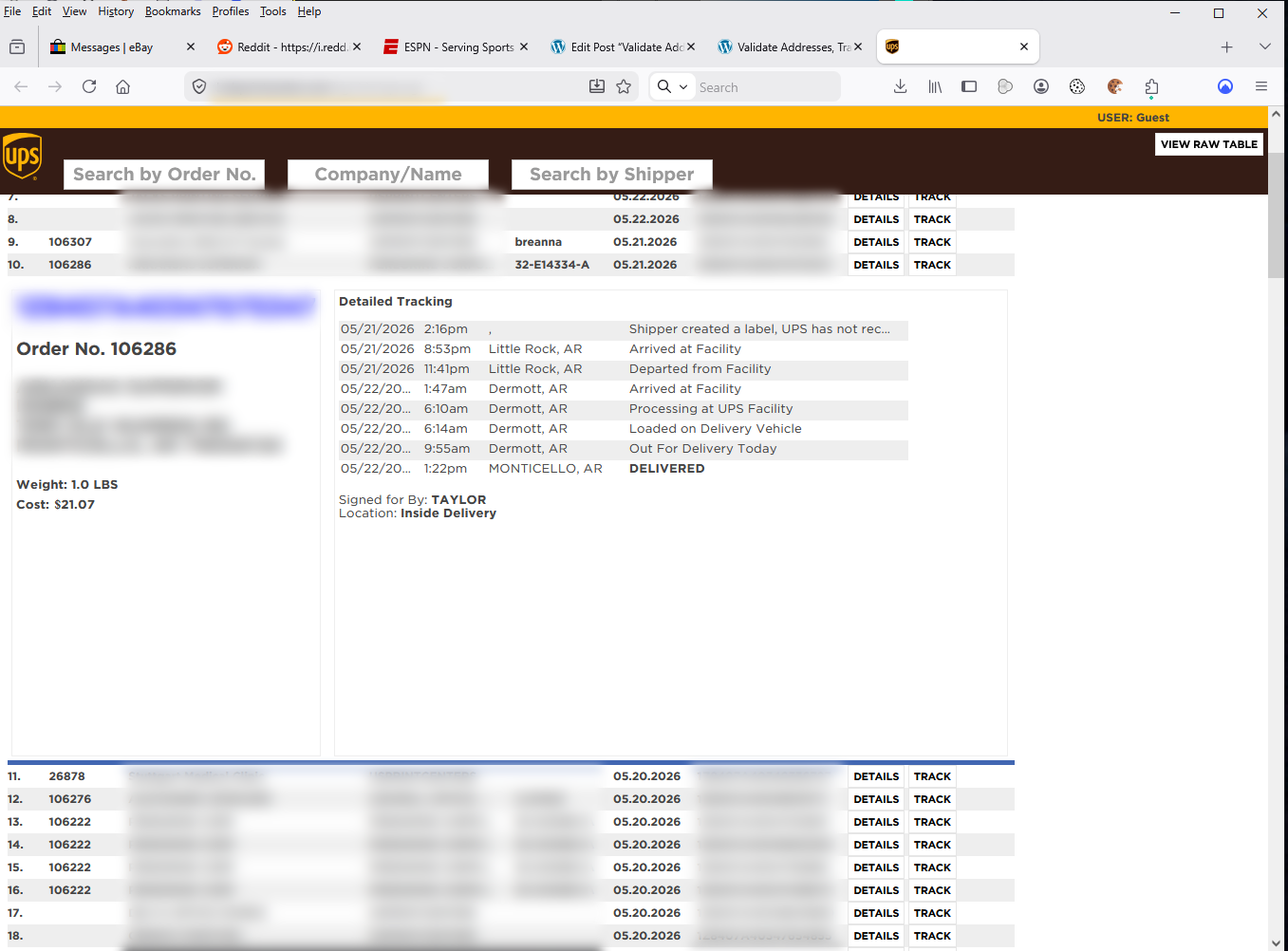
This image is from an internal webpage I created — I use it at work. Parsing the data received from UPS can be a challenge. Anyone reading should already know this, but you will need a firm grasp on JSON and the data structures of the scripting language you are using.
The only thing missing from the UPS tracking API is photo Proof of Delivery (POD). The JSON data will tell you there is a photo, but to my knowledge there is no way to access the actual photo through the API. I’m hoping this will change in the future.
Final Thoughts
- Addresses returned by UPS Validation can also be used with other carriers, such as FedEx and USPS. Addresses are valid regardless of what company is making the delivery.
- UPS assumes no liability when performing address validation. In the end, the shipper and/or customer is ultimately responsible for providing accurate addresses and UPS Validation is only a tool to help meet that end.
Address validation can help identify typos and data input errors, but by no means is it a catch-all tool. If used in an e-commerce environment it should alert the customer when a problem is detected and prompt for actions to be taken.
Personally, I didn’t like having to re-write my UPS code for OAuth 2.0. I understand why UPS did it, but they should have let the end user decide to make the switch. When PayPal moved to OAuth 2.0, new users couldn’t request API keys. Everyone already using API keys were grandfathered in.